scpmkj@gmail.com
Get A Free Quote


 share
share
For our common handheld inkjet printers, whether they can operate normally or type clearly during inkjet printing has a great relationship with the normal use of ink cartridges; When a user uses a handheld inkjet printer to print text, numbers, dates, times, picture logos, etc., the font color distortion, segment lines, and blurred handwriting appear, among which nozzles like handheld printers have many small holes on the surface., when the ink is in contact with the air for a long time or is not used for a long time, the nozzle of the handheld inkjet printer will be blocked. Let's take a look at how to clean and solve it.
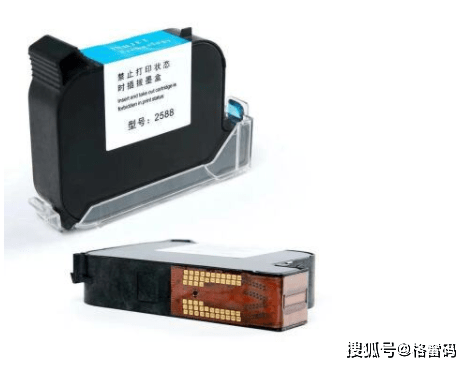
1. Spray cleaning solution on the dust-free cloth and spray the dust-free cloth wet.
2. Then put the slash of the two spray holes of the ink cartridge nozzle of the handheld inkjet printer parallel to the direction of the spray holes, walk in one direction, and pull out the two lines, remember to press and pull them in one direction (do not wipe back and forth, or rub it horizontally, which will easily damage the nozzle).
3. After cleaning, you can try to spray again and check whether the hole has been cleaned. Remember to use a special alcohol-grade cleaning agent, usually about 75% or 99% alcohol; If the ink cartridge is soluble in water, it can be cleaned with water.
4. After the cleaning meeting, conduct a test. If the problem is solved, it will be fine. If there are still problems, repeat the cleaning several times.